Technically reviewed by Vitaly Ogulev, founder of Netcomp Solutions (Brisbane managed IT and cyber security since 2002).
Ransomware attacks are now the rule rather than the exception. According to the Veeam 2025 Ransomware Trends and Proactive Strategies Report, 89% of organisations that suffered a ransomware attack had their backup repositories targeted, and 34% of those repositories were modified or deleted by attackers. That single statistic should change the way every Brisbane small business thinks about backup and disaster recovery. Attackers no longer simply encrypt your files and demand payment. They hunt for your backups first, delete or corrupt them, and then lock you out, leaving you with no safe copy to restore from. This article explains how to build a backup and disaster recovery strategy that survives a modern ransomware attack, including the specific technologies and frameworks Brisbane SMBs should be using in 2026, without requiring a technical background to understand or act on them.
Why 2026 Is a Turning Point for Australian SMB Backup Strategy
The threat environment facing Australian businesses has changed dramatically. According to the ASD’s ACSC Annual Cyber Threat Report 2024–25, ReportCyber received over 84,700 cybercrime reports in FY2024–25 — an average of one report every six minutes. These are not all large enterprises. Small businesses account for a significant share of victims, and they consistently suffer worse outcomes because they lack the recovery infrastructure that larger organisations take for granted.
The financial stakes are real and immediate. Australia’s cybercrime costs averaged AU$80,850 per business incident, according to ACSC-related reporting cited by Delta Insurance. For a small business operating on tight margins, a single incident of that magnitude can be catastrophic. Sixty percent of businesses without proper backups close within six months of a major attack, according to a FEMA SMB Resilience Study. That is not a recovery problem. That is a business survival problem.
The policy environment is also shifting. Australia’s 2023-2030 Cyber Security Strategy has entered Horizon 2 (2026-2028), with a specific focus on strengthening cyber maturity across the economy, including small businesses. Backup and disaster recovery is no longer treated as routine IT maintenance. As guidance from Cyber.gov.au now makes clear, it is a governance and business continuity requirement that boards and business owners are expected to understand and oversee.
How Modern Ransomware Attacks Your Backups
Understanding what you are protecting against makes it much easier to choose the right defences. In 2026, ransomware has evolved well beyond simple file encryption. According to the Verizon 2025 Data Breach Investigations Report, ransomware was present in 44% of analysed breaches — up from 32% the previous year — and credential-driven, identity-focused intrusions now dominate the threat landscape. The ACSC’s Annual Cyber Threat Report 2024–25 echoes this, with ransomware accounting for 11% of all reported cybercrime and a 280%+ rise in denial-of-service activity, indicating that attackers are operating across multiple fronts rather than relying on a single technique.
Here is the typical attack sequence that Brisbane SMBs now face:
- Initial access: According to the Verizon 2025 DBIR, stolen credentials remain the top initial access vector at 22% of breaches, followed by vulnerability exploitation at 20% (a 34% year-over-year increase) and phishing at 16%. The widely repeated “94% of malware is delivered by email” line traces back to the 2019 DBIR and is no longer representative — attackers today are just as likely to walk in with a stolen password or exploit a public-facing VPN as they are to send a phishing email.
- Reconnaissance and persistence: The attacker moves quietly through your systems, sometimes for weeks, mapping your data and identifying your backup locations.
- Backup sabotage: Before activating ransomware, the attacker deletes, encrypts, or corrupts your backup copies. Cloud-connected backups that use the same credentials as your production environment are particularly vulnerable.
- Encryption and extortion: With backups gone, the attacker encrypts your live data and presents the ransom demand, knowing you have no alternative.
This is why traditional backup approaches, such as a single nightly copy stored on a network-attached drive or a standard cloud sync, are no longer sufficient. They are reachable by the same attacker who has compromised your network.
The 3-2-1 Backup Strategy Explained for Brisbane Businesses
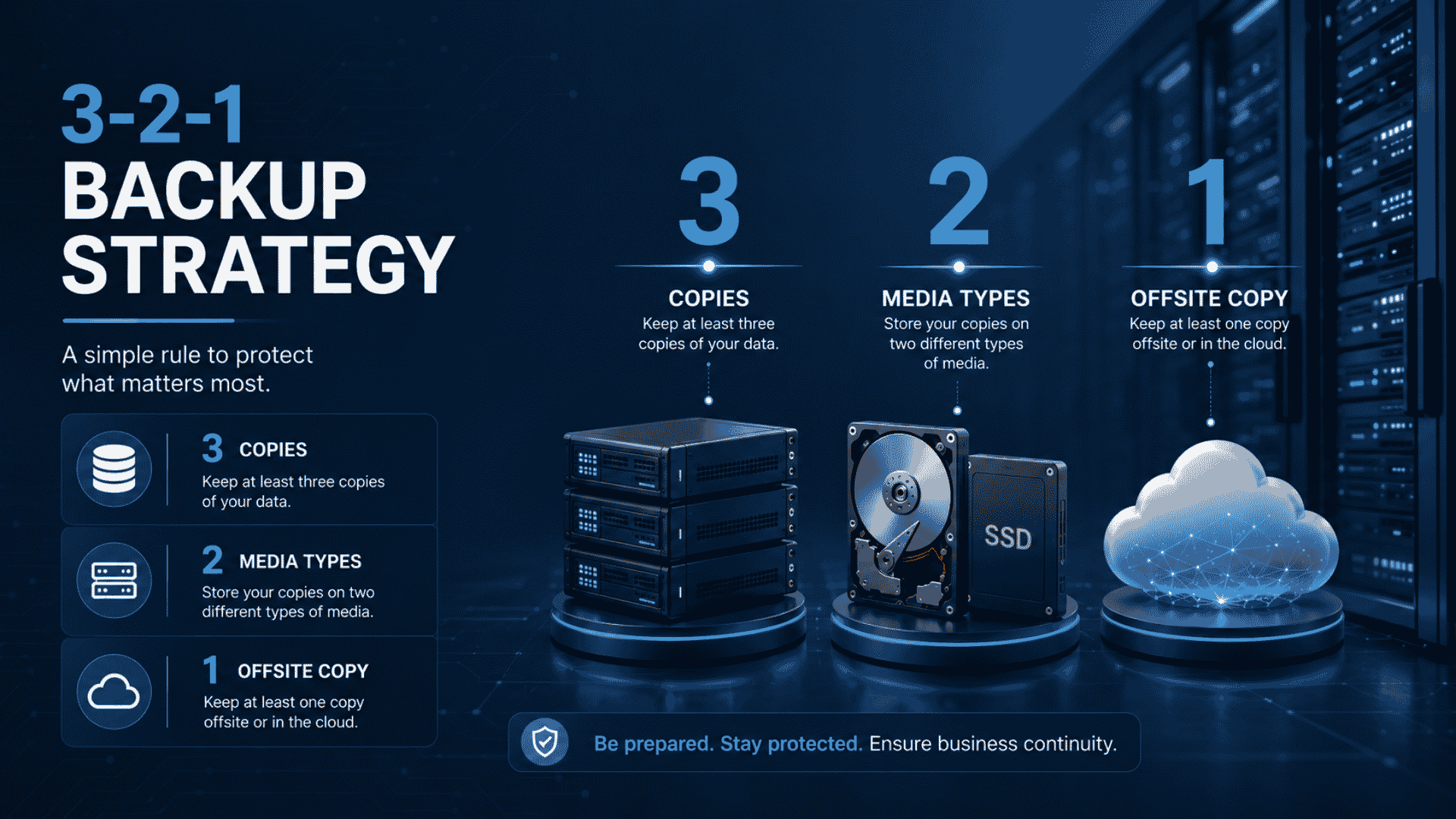
The 3-2-1 backup strategy is the minimum standard recommended by security professionals and is directly relevant to ransomware protection for small businesses. The concept is straightforward, but implementation details matter enormously.
What 3-2-1 Means in Practice
- 3 copies of your data: One primary copy and two backups. Redundancy ensures that no single failure destroys everything.
- 2 different storage media types: For example, one copy on local storage and one in the cloud. Different media types protect against hardware-specific failures.
- 1 copy kept offsite (or offline): At least one backup must be physically or logically separated from your main environment. This is the copy that survives a network compromise.
Why the “1” Has to Be Immutable and Air-Gapped in 2026
A 3-2-1 strategy now requires the offsite copy to meet a higher standard than simply storing it in a different location. It must be immutable, which means nobody can alter or delete it once written — not even an administrator. It also benefits from being air-gapped, which means it has no persistent live connection to your primary network or to the credentials that manage your production systems.
Immutability is typically enforced through object lock features in cloud storage platforms, or through purpose-built backup appliances. Air-gapping can be achieved through physical offline media, or through logically isolated cloud vaults that require separate authentication. And are not accessible from within the compromised network.
For Brisbane SMBs, a practical implementation can combine several backup layers. A local backup appliance enables fast restores. A secondary cloud backup in an Australian data centre provides offsite redundancy. An immutable vault copy adds extra protection. Use separate access credentials that are never used on the primary network.
Setting Your RPO and RTO: A Plain-Language Framework
Two terms define how well your backup strategy actually performs under pressure. You do not need an IT background to work with them, but you do need to set them deliberately rather than discovering them during a crisis.
Recovery Point Objective (RPO)
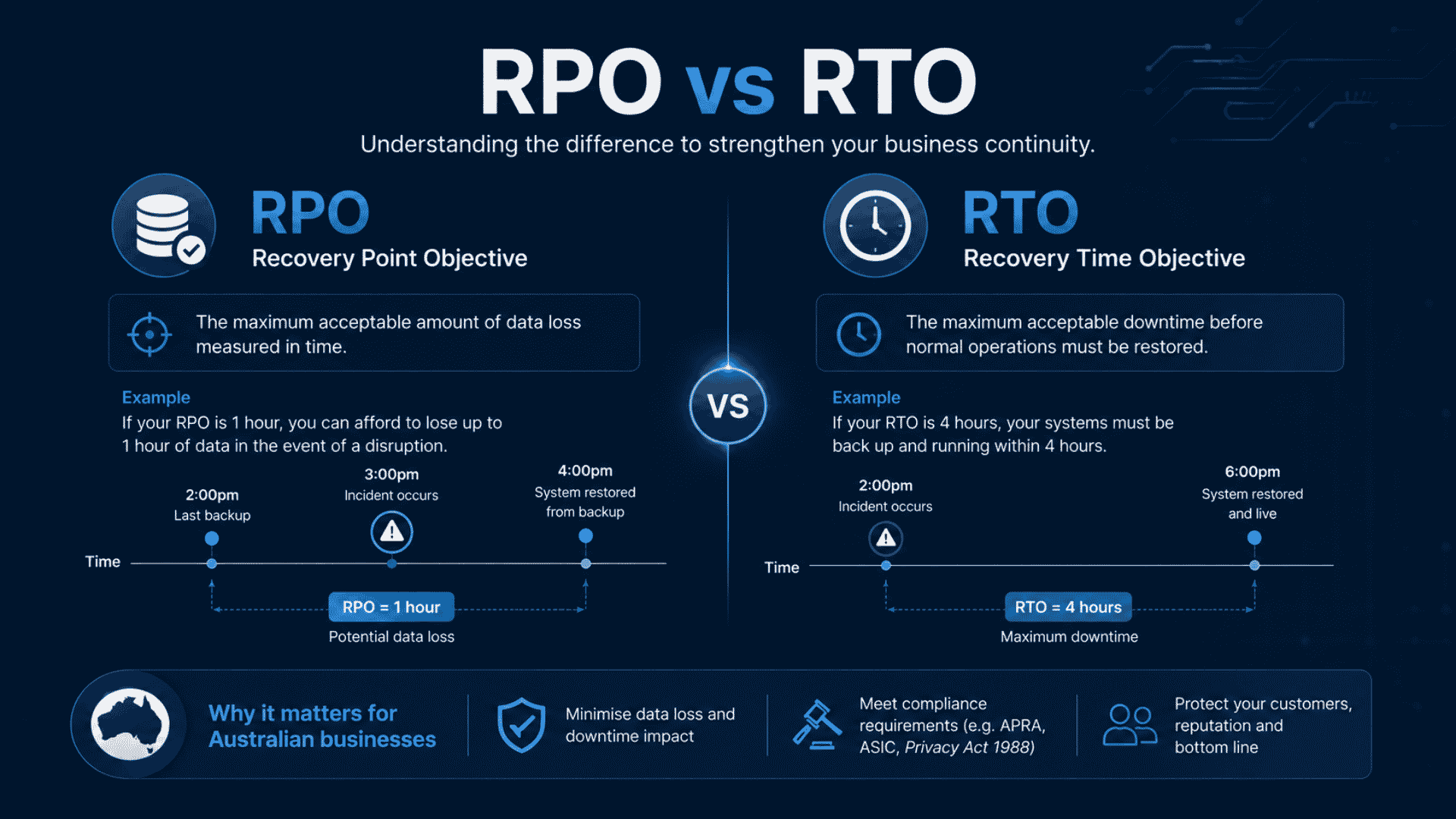
RPO answers the question: “How much data can we afford to lose?” If your RPO is 24 hours, you accept the risk of losing one full day of work. A recovery scenario could erase invoices, customer orders, or healthcare records created during that period. For many businesses, a 24-hour RPO could result in thousands of dollars in lost transactions. It could also increase compliance risk. Brisbane SMBs should assess how quickly they create critical data. They should then set an RPO that reflects real business tolerance. Do not base your RPO only on the limits of your current backup system.
Recovery Time Objective (RTO)
RTO answers the question: “How long can we afford to be offline?” The average ransomware downtime for Australian SMBs is 22 days, according to the Datto Global Ransomware Report 2026. Twenty-two days is not a technology failure. It is a planning failure. Businesses that test their restores regularly, maintain documented recovery procedures, and use purpose-built recovery platforms consistently return to operations in hours or days, not weeks.
Brisbane-Specific Considerations
Queensland businesses face additional business continuity pressures from extreme weather events, which can affect physical infrastructure alongside cyber incidents. Your RPO and RTO framework should account for combined disaster scenarios. Flooding or power disruption can occur during or after a cyber incident. For Brisbane and South East Queensland businesses, geographically separate backups provide stronger resilience. An offsite or cloud-based backup in a separate Australian data centre offers particularly valuable protection.
What Good Looks Like: Practical Steps for SMBs
Knowing the theory is useful, but Brisbane business owners need a clear action list. The following steps represent current best practice for ransomware protection for small businesses in 2026.
- Audit your current backups today. Identify every system that holds business-critical data, including Microsoft 365 mailboxes and SharePoint, accounting software, customer databases, and operational systems. Confirm that each has a backup, and that the backup is actually working.
- Implement immutable backup storage.Ensure you write at least one copy of your data to immutable storage so attackers cannot delete or overwrite it, even if they compromise your main accounts.
- Separate backup credentials from production credentials. Use a separate account to manage your backups instead of relying on the same account you use for day-to-day operations. This is one of the most overlooked gaps in SMB backup environments.
- Test your restores on a scheduled basis. A backup you have never tested is a backup you cannot trust. Quarterly restore tests, with documented results, should be a standard business practice.
- Document your recovery procedures. Your staff should be able to begin a recovery process without waiting for a specific person to be available. Written, step-by-step procedures reduce recovery time significantly.
- Include data notification readiness in your plan. The OAIC recorded 1,113 data breaches in 2024, the highest annual total since mandatory reporting began in 2018. If a breach involves personal information, you have notification obligations. Your recovery plan should include the steps for assessing and reporting a notifiable breach.
Choosing the Right Backup and Disaster Recovery Partner in Brisbane
Technology vendors such as Datto, Veeam, and others provide capable backup platforms, but technology alone does not create a resilient recovery capability. Platform selection matters less than how you configure, monitor, and test the solution on an ongoing basis. A poorly configured backup system or one you never verify will fail precisely when you need it most.
When evaluating a managed backup and disaster recovery provider for your Brisbane business, consider the following questions:
- Do they offer immutable and air-gapped backup options as standard, not as an optional upgrade?
- Can they provide documented evidence of regular restore tests, not just confirmation that backups are running?
- Do they store backup data in Australian data centres, ensuring compliance with Australian privacy law?
- Are their backup management credentials completely separate from the credentials used on your production systems?
- Can they provide a defined RPO and RTO commitment in writing, as part of a managed service agreement?
Business continuity in Brisbane depends on choosing partners who understand the local regulatory environment. Your provider should also understand the specific risks facing Australian SMBs. They must recognise the operational realities of running a small business with limited internal IT resources.
Conclusion: Backup and Disaster Recovery Is Now a Business Decision, Not Just an IT Decision
The 2026 ransomware landscape has made one thing clear: backup and disaster recovery in Brisbane is not a technical afterthought. It is a core business continuity requirement. Immutable, air-gapped backups are the minimum standard. Tested recovery procedures and defined RPO and RTO targets are the difference between a 22-day outage and a same-day recovery. With breach costs averaging AU$80,850 per incident and 60% of unprepared businesses closing within six months, the investment in a proper backup strategy is straightforward to justify. Get in touch with Netcomp for a free consultation on backup and disaster recovery for your Brisbane business, and find out exactly where your current strategy leaves you exposed.
Frequently Asked Questions
What is the 3-2-1 backup strategy and does my small business really need it?
The 3-2-1 backup strategy means keeping three copies of your data, on two different types of storage, with one copy stored offsite or offline. For Brisbane small businesses in 2026, this minimum recommended standard is no longer an advanced option. Ransomware attackers specifically target backups before they trigger encryption, which means they will likely destroy a single backup copy stored on your network before you can use it. The 3-2-1 approach ensures you retain at least one clean, recoverable copy regardless of what happens to your primary environment.
How long does it typically take to recover from a ransomware attack?
Generally the average ransomware downtime for Businesses is 24 days. However, this figure reflects businesses that failed to prepare, test their backups, document recovery procedures, or maintain an offsite copy. Businesses with immutable backups, tested restore processes, and a documented disaster recovery plan consistently achieve recovery in hours or days. The recovery time is largely determined by preparation, not by the attack itself.
Does Microsoft 365 automatically back up my business data?
No. Microsoft 365 delivers high availability to keep services online, but it does not comprehensively back up your data in the way most business owners assume. Microsoft’s standard retention policies do not protect against deliberate deletion, ransomware-triggered corruption, or accidental removal of files and emails. Brisbane businesses relying solely on Microsoft 365 for data protection should implement a dedicated third-party backup solution that creates independent, immutable copies of mailboxes, SharePoint, and Teams data stored in an Australian data centre.
What is the difference between RPO and RTO, and how do I set them for my business?
Recovery Point Objective (RPO) is the maximum amount of data your business can afford to lose, expressed as a time period. For example, an RPO of four hours means you are prepared to recreate or accept the loss of up to four hours of data. Recovery Time Objective (RTO) is the maximum amount of time your business can operate without access to its systems before the impact becomes unacceptable. To set these for your Brisbane business, start by identifying your most critical systems and asking how long each could be offline before causing serious harm to customers, revenue, or compliance obligations. A managed IT provider can then match a backup and disaster recovery solution to those specific targets.