Every six minutes, an Australian business reports a cybercrime. Moreover, the average cost per incident reaches $56,600 for small businesses according to ACSC data. These aren’t just statistics—they’re wake-up calls for Brisbane and Gold Coast business owners.
Small businesses have become prime targets. Consequently, 60% of small companies close within six months after cyber attacks. The good news? Therefore, implementing five cybersecurity tools for small business Australia can block most attacks today.
Why Australian Small Businesses Need Better Cybersecurity
Cybercrime in Australia has reached critical levels. Specifically, the ACSC received over 84,700 reports in the 2024-25 financial year.
Phishing attacks remain the number one entry point. Additionally, ransomware continues surging across Queensland businesses. Furthermore, business email compromise (BEC) fraud targets companies daily.
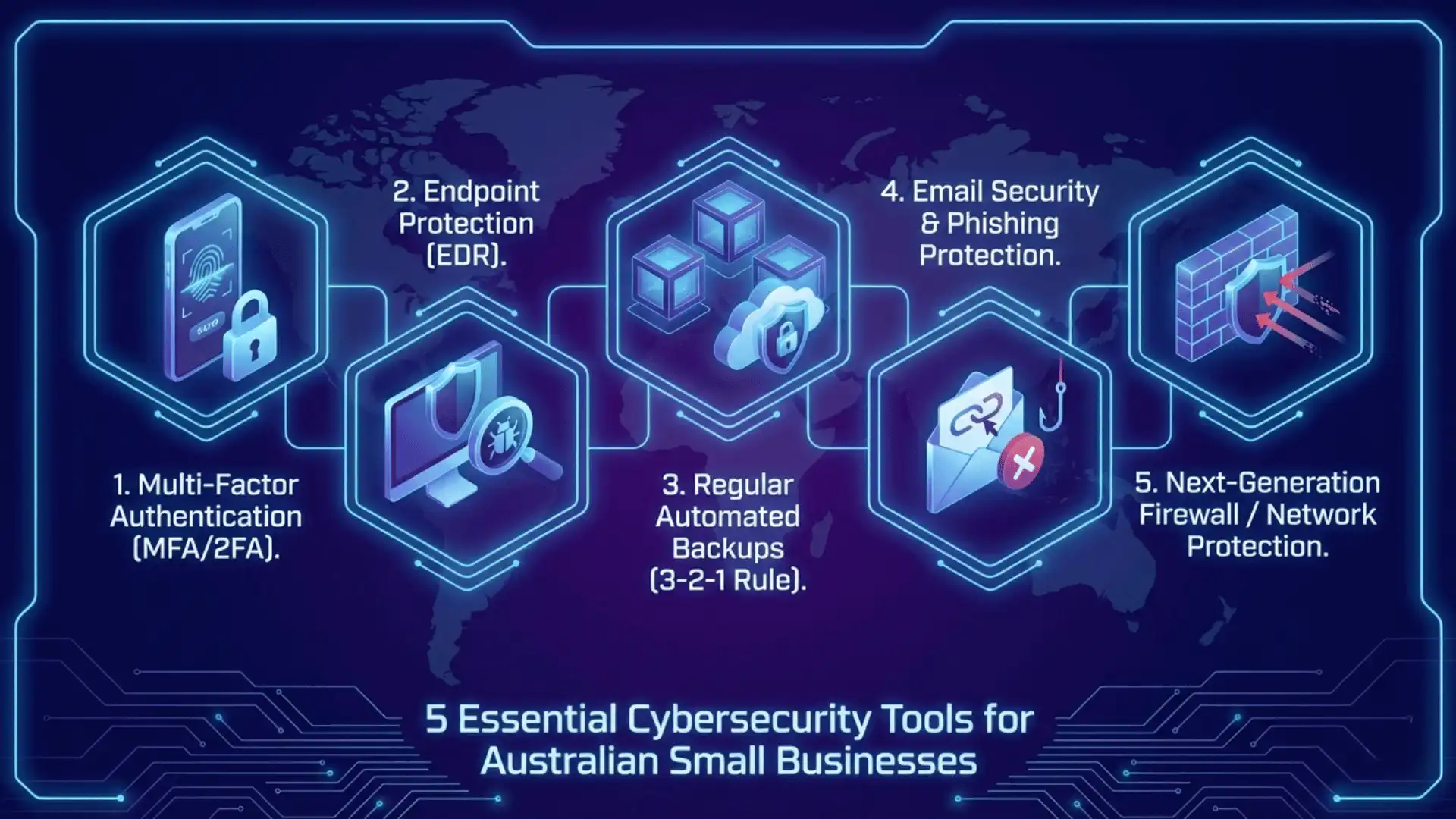
However, most attacks can be prevented. Therefore, let’s explore the five essential cybersecurity tools for small business Australia recommended by experts.
Tool #1: Multi-Factor Authentication (MFA) — Your First Defence
Multi-factor authentication is the most effective cybersecurity control available. In fact, the ACSC ranks MFA as priority #1 in their Essential Eight framework. Consequently, enabling MFA blocks over 99 % of automated attacks according to Microsoft research.
How MFA Works
MFA requires users to prove identity using two methods. Specifically, this combines something you know (password) with something you have (phone). Therefore, even if hackers steal passwords, they can’t access accounts.
Where to Enable MFA Immediately
Start with email accounts on Microsoft 365 or Google Workspace. Additionally, protect cloud storage like OneDrive and Google Drive. Furthermore, secure banking and financial systems urgently.
Finally, enable MFA for remote access and VPN connections. Consequently, staff working from home maintain strong security.
Free and Affordable MFA Options
- Microsoft Authenticator – Free for Microsoft 365 users
- Google Authenticator – Free for Google Workspace users
- YubiKey hardware keys – Strongest protection, starting around $50
The Australian Government’s cybersecurity resources include detailed MFA implementation guides.
Tool #2: Endpoint Protection with EDR Features
Modern endpoint security goes beyond traditional antivirus. Specifically, Endpoint Detection and Response (EDR) actively monitors devices for suspicious behaviour. Therefore, it catches threats that traditional antivirus misses.
Microsoft Defender for Business: The Australian SMB Advantage
Microsoft Defender for Business stands out for Queensland businesses. Specifically, it integrates with Microsoft 365 environments.
Key advantages include:
- Australian data residency for compliance with local regulations
- AI-driven threat detection identifies malware and ransomware automatically
- Cost-effective pricing – included with Microsoft 365 Business Premium
- Automated investigation reduces manual security work
According to Microsoft’s Essential Eight documentation, Defender for Business meets ACSC standards. Furthermore, it supports Australian government cybersecurity frameworks.
Alternative Endpoint Protection Solutions
- Bitdefender GravityZone Business Security – Comprehensive protection
- Avast Business Antivirus Pro Plus – Budget-friendly for micro-businesses
- CrowdStrike Falcon Go – Tailored for small businesses with easy setup
Essential Features to Look For
Ransomware protection is absolutely non-negotiable. Additionally, centralised management simplifies security across devices. Moreover, automatic updates ensure protection against latest threats.
Tool #3: Regular Automated Backups Following the 3-2-1 Rule
Backups are your ultimate insurance policy. Specifically, proper backups ensure business continuity after ransomware attacks. Therefore, they’re among the most critical cybersecurity tools for small business Australia.
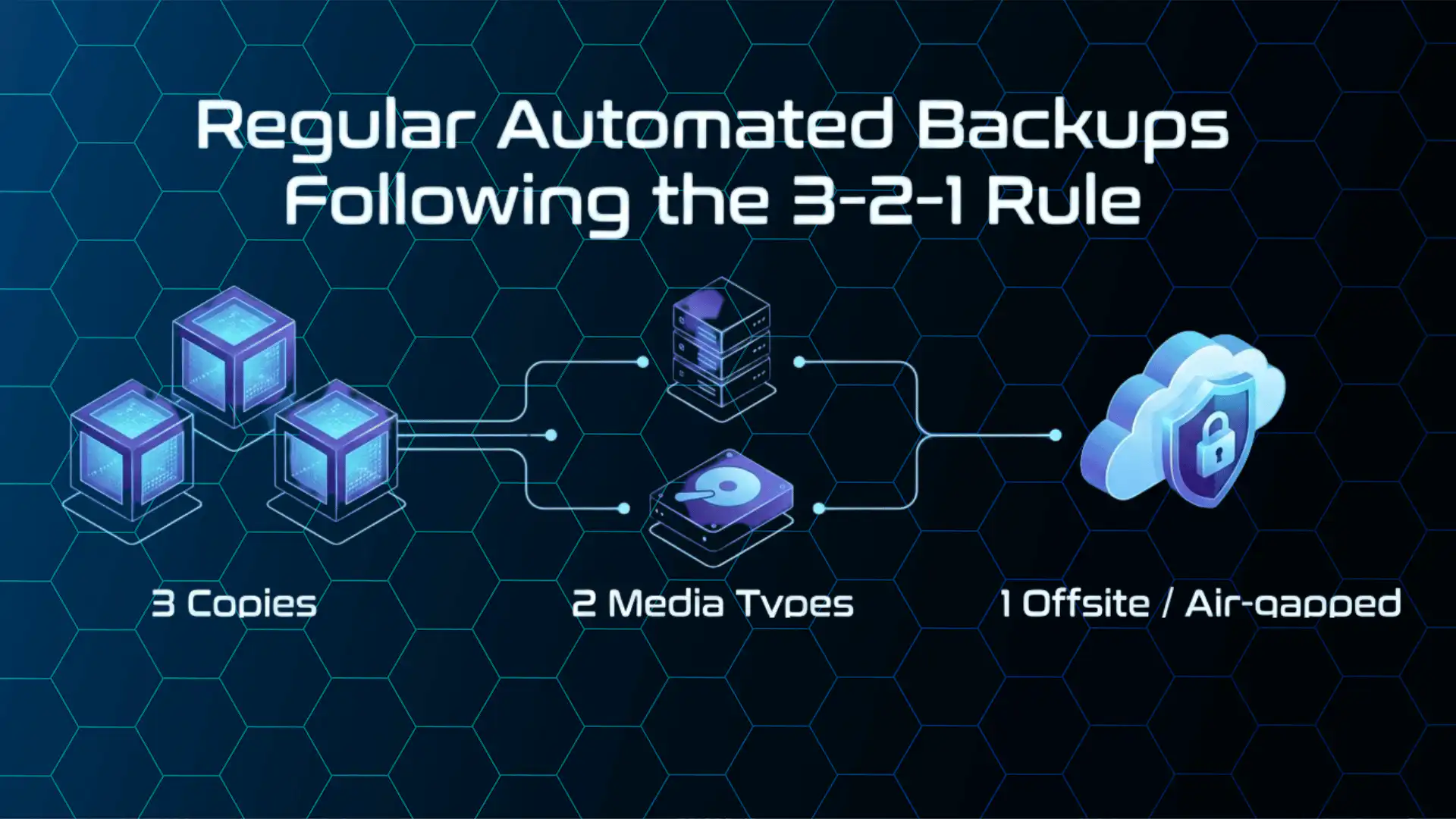
The 3-2-1 Backup Rule Explained
Keep 3 copies of important data. Additionally, store them on 2 different types of media. Finally, keep 1 copy offsite or air-gapped.
This approach protects against multiple failure scenarios. Moreover, the ACSC strongly recommends this strategy.
Why Backups Stop Ransomware
Ransomware can cripple businesses within hours. Furthermore, cybercriminals often target backup systems first. Therefore, air-gapped and immutable backups are essential.
Proper backups eliminate the need to pay ransoms. Moreover, you can restore operations quickly. Consequently, backups directly reduce downtime and financial losses.
Recommended Backup Solutions
- Microsoft OneDrive for Business – Includes automatic version history
- Google Drive for Business – Generous storage with Google Workspace
- Acronis Cyber Protect – Comprehensive backup with anti-ransomware
- Built-in Windows/Mac backups – Free and reliable for basic needs
Backup Best Practices
Test restores monthly to ensure backups work. Additionally, automate everything to eliminate human error. Furthermore, encrypt backup data to protect sensitive information.
Document procedures clearly for all staff. Finally, keep backups offline when possible. Specifically, disconnect external drives after backing up.
Tool #4: Email Security and Phishing Protection
Email remains the primary attack vector. Specifically, phishing accounts for over 90% of successful breaches. Therefore, advanced email security is absolutely critical.
Why Phishing Threatens Australian Businesses
Phishing attacks have become incredibly sophisticated. Moreover, AI-powered scams now create convincing fake emails. Consequently, even experienced employees fall victim.
Recent data shows phishing attempts doubled. Similarly, attackers increasingly target small businesses specifically. Therefore, assuming you’re “too small” is dangerous.
Email Security Solutions for Queensland SMBs
- Microsoft 365 Defender – Advanced anti-phishing AI included
- Proofpoint Essentials – Enterprise-grade filtering for SMBs
- Barracuda Email Security Gateway – Comprehensive spam and malware protection
- Mimecast Email Security – Cloud-based advanced protection
Each solution offers different strengths. Consequently, assess your specific risks and budget.
Employee Awareness Training
Technology alone cannot stop all attacks. Therefore, educated employees are your strongest defence.
Free ACSC resources provide excellent materials. Specifically, the Cyber Wardens program offers free online training. Moreover, it’s designed specifically for Australian businesses.
Simulated phishing campaigns test awareness regularly. Similarly, regular security reminders keep cybersecurity top-of-mind.
Key Email Security Features
Advanced threat protection analyses attachments automatically. Additionally, spoofing prevention protects against BEC fraud. Furthermore, email encryption secures sensitive information.
Tool #5: Next-Generation Firewall and Network Protection
Your network perimeter needs strong protection. Specifically, firewalls prevent unauthorised access to business systems. Therefore, they’re essential infrastructure for cybersecurity.
Understanding Modern Firewall Protection
Traditional firewalls only block basic traffic. However, next-generation firewalls (NGFWs) provide deep packet inspection. Consequently, they identify and block sophisticated threats.
NGFWs combine multiple security functions. Additionally, they include intrusion prevention, malware detection, and VPN. Moreover, this consolidation simplifies security management.
Fortinet FortiGate: Popular Australian Choice
FortiGate firewalls are widely deployed across Australia. Specifically, they offer all-in-one security for small networks.
Key advantages include:
- Integrated VPN for secure remote access
- Real-time threat intelligence from FortiGuard
- All-in-one security reduces complexity
- Local Australian support from Brisbane and Gold Coast IT providers
Cloud-Based Firewall Alternatives
- Microsoft Azure Firewall – Ideal for businesses using Microsoft 365
- Managed firewall services – Local IT providers handle configuration
- Basic router firewalls – For very small setups initially
- Cisco Meraki MX – Cloud-managed simplicity
Essential Firewall Features
Intrusion prevention blocks active attack attempts. Additionally, application control restricts unauthorised software. Furthermore, web filtering blocks malicious websites.
VPN support is crucial for remote work. Moreover, automatic updates maintain protection. Consequently, look for cloud-managed solutions.
How Netcomp Solutions Helps Brisbane and Gold Coast Businesses
Implementing these five tools might seem overwhelming. However, you don’t have to do it alone. Therefore, partnering with experienced IT support makes implementing cybersecurity tools for small business Australia much easier.
Tailored Cybersecurity Solutions
Netcomp Solutions understands challenges facing Queensland businesses. Specifically, we’ve helped Brisbane and Gold Coast companies strengthen security. Therefore, we know what works in practice.
Our team assesses your specific risks. Additionally, we recommend solutions fitting your budget. Moreover, we handle implementation from start to finish.
We specialise in Microsoft 365 security. Similarly, we’re experts in ACSC Essential Eight compliance. Furthermore, we provide ongoing support and monitoring.
Comprehensive IT Support Services
- Managed IT services – Proactive monitoring and maintenance
- Cybersecurity assessments – Identify current vulnerabilities
- 24/7 monitoring – Detect threats before damage occurs
- Staff training – Regular awareness sessions
Getting Started Today
Don’t wait until after an attack. Instead, take action immediately with these five tools. Moreover, prevention costs far less than recovery.
Contact Netcomp Solutions for a free security consultation. Therefore, we’ll assess your current protection level. Additionally, we’ll recommend cost-effective improvements.
Call 1300 363 127 or visit netcomp.com.au today.
Don’t become another statistic in Australia’s cybercrime reports. Instead, take action now to protect your business. Furthermore, your customers, employees, and future depend on it.
Netcomp Solutions provides expert IT support and cybersecurity services to small businesses across Brisbane, Gold Coast, Sydney, Melbourne and Perth. We specialise in ACSC Essential Eight compliance, Microsoft 365 security, and comprehensive managed IT services.