Technically reviewed by Vitaly Ogulev, founder of Netcomp Solutions (Brisbane managed IT and cyber security since 2002).
Australian businesses filed 84,700 cybercrime reports in FY2024–25, and small businesses remain disproportionately in the crosshairs. Yet many Brisbane SMB owners still treat the ASD Essential Eight as something designed for large government agencies or enterprise IT departments. It is not. The Essential Eight is a practical, government-defined set of cyber security controls. Specifically, these controls stop the most common attacks. In 2026, both insurers and regulators expect alignment from businesses. The good news? You do not need a six-figure IT budget to make meaningful progress. We wrote this step-by-step roadmap specifically for Brisbane small businesses. It starts with the three controls that deliver the biggest security return and builds from there.
What Is the Essential Eight and Why Does It Matter to Brisbane SMBs in 2026?
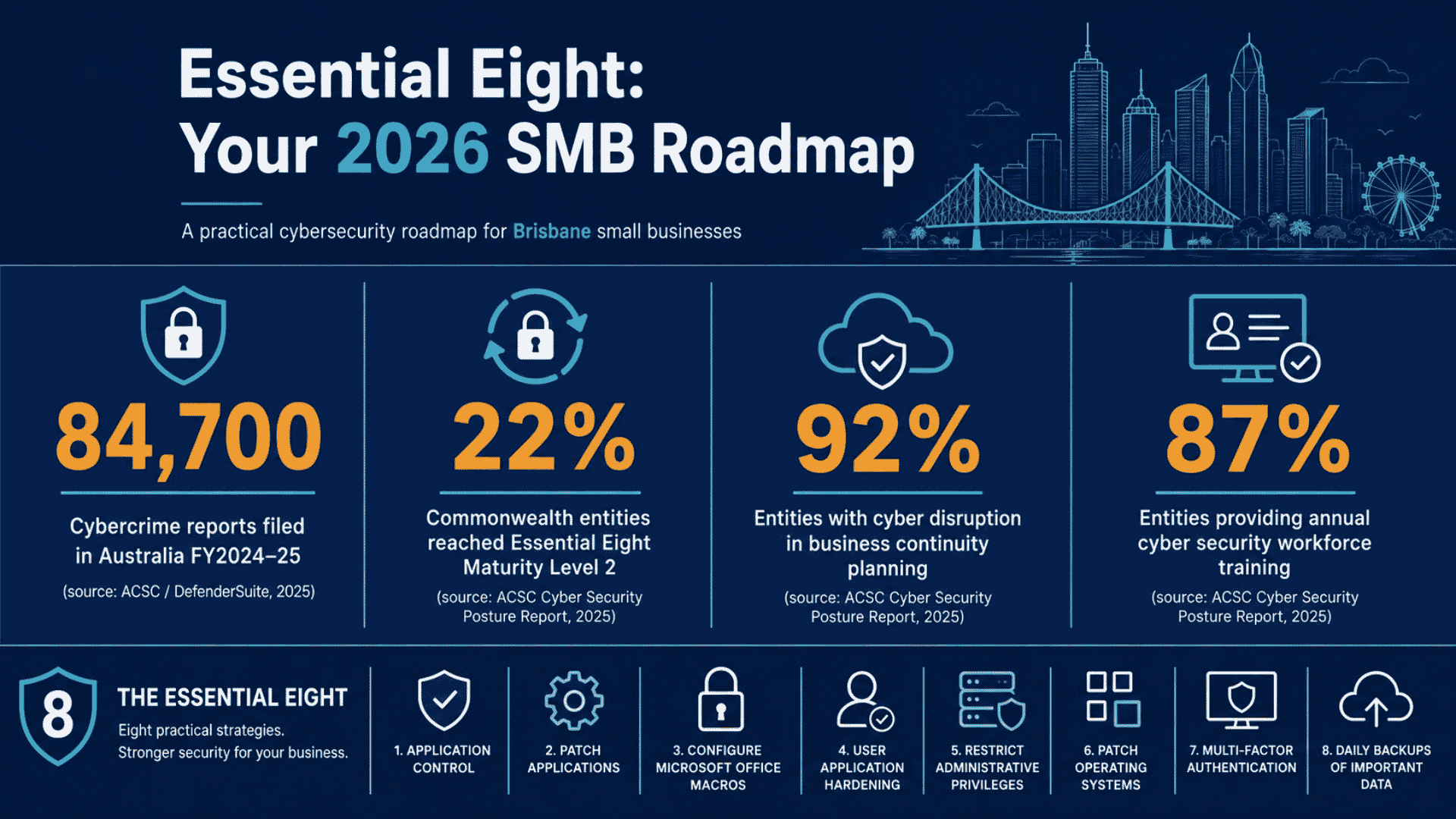
The ASD Essential Eight is a framework published by the Australian Signals Directorate (ASD) comprising eight mitigation strategies most effective at preventing cyber intrusions. The controls span areas including application patching, multi-factor authentication (MFA), restricting administrative privileges, application control, macro settings, user application hardening, regular backups, and patching operating systems.
Each control is assessed against three maturity levels. For example, Maturity Level 1 represents baseline protection against commodity threats. Maturity Level 2 targets more sophisticated adversaries. Maturity Level 3 addresses advanced, targeted attacks. Therefore, for most Brisbane small businesses, Maturity Level 1 consistently across all eight controls is the immediate and achievable goal for 2026.
Progress across Australian organisations is accelerating. According to the ACSC’s Commonwealth Cyber Security Posture in 2025 report, 22% of Commonwealth entities reached overall Maturity Level 2 across the Essential Eight, up from just 15% in 2024. While those are large government organisations, the upward trend sets expectations for everyone. As a result, cyber insurance questionnaires and IT audit frameworks now routinely ask whether your business has implemented Essential Eight controls. This makes Essential Eight implementation a commercial necessity, not just a security one.
The Three Controls to Implement First (Highest Impact, Lowest Complexity)
Not all eight controls are equal in terms of effort versus payoff. For a small business with limited IT resources, sequencing matters. Here are the three controls that deliver the strongest return and where your roadmap should begin.
1. Multi-Factor Authentication (MFA)
MFA requires users to verify their identity using two or more factors before accessing systems or data. In fact, it is arguably the single most effective control against credential-based attacks. These attacks drive a substantial share of business email compromise and ransomware incidents. At Maturity Level 1, you must apply MFA to remote access solutions and privileged accounts at a minimum. For most Brisbane SMBs using Microsoft 365 or Google Workspace, enabling MFA costs nothing beyond staff training time. Start here.
2. Patching Applications
Unpatched software is one of the most commonly exploited entry points for attackers. At Maturity Level 1, you should apply critical patches for internet-facing services within two weeks of release. For applications not internet-facing, the window extends to one month. Additionally, many small businesses unknowingly run outdated versions of browsers, PDF readers, and productivity tools. A managed patching schedule — whether your team handles it or your IT provider does — addresses this quickly and cost-effectively.
3. Restricting Administrative Privileges
Admin accounts have elevated access across your systems. If an attacker compromises a standard user account, the damage is limited. If they compromise an admin account, the damage can be catastrophic. At Maturity Level 1, you should validate administrative privileges every 12 months. Staff should also use separate admin and standard accounts. This is a configuration change, not a purchase, making it one of the most budget-friendly controls available. Notably, the ACSC report found that only 45% of Commonwealth entities provided annual privileged user training in 2025, down from 51% the previous year. This highlights a real gap that small businesses can get ahead of.
Building Out the Full Essential Eight: Controls Four Through Eight
Once MFA, patching, and privilege restriction are in place, you have a meaningful security baseline. The next phase of your Essential Eight implementation roadmap tackles the remaining five controls, which can realistically be staged across a six-to-twelve-month window.
- Application Control: Prevent unapproved or malicious programs from executing on your workstations. At Maturity Level 1, this means ensuring only approved applications can run. Your IT provider can configure Microsoft AppLocker or similar tools.
- Restricting Microsoft Office Macros: Macros embedded in Office documents are a classic malware delivery mechanism. At Maturity Level 1, you should disable macros for users who do not have a documented business need.
- User Application Hardening: This involves configuring browsers and other internet-facing applications to reduce attack surface. Disabling Flash (already end-of-life), blocking web ads, and preventing web browsers from processing Java are examples.
- Patching Operating Systems: Similar logic to application patching but applied to Windows, macOS, iOS, and Android. You should apply critical patches for internet-facing devices within two weeks at Maturity Level 1.
- Regular Backups: Meanwhile, this is your recovery safety net. At Maturity Level 1, you should back up important data, software, and configuration settings daily. Store backups disconnected from the network and test them for restoration regularly. The ACSC reported that 92% of Commonwealth entities addressed cyber security disruptions in their business continuity planning in 2025, up from 86% in 2024. This is a clear signal that backup and recovery planning now represents a baseline expectation.
Taken together, these five controls complement the first three and move your business toward a defensible, insurable security posture for 2026.
How to Sequence Your Roadmap Without Blowing the Budget

Budget is the most common obstacle Brisbane small businesses raise when discussing Essential Eight implementation. The framework does not require expensive new tools for every control. Many can be addressed through configuration changes in software you already pay for. Here is a practical sequencing approach.
- Months 1 to 2: Enable MFA across Microsoft 365, Google Workspace, or your cloud services. Audit admin accounts and separate standard from privileged access. These are configuration tasks, not purchases.
- Months 2 to 4: Implement a patching schedule for applications and operating systems. If you use a managed IT provider, patching should already be included in your service agreement. If not, this is worth adding.
- Months 4 to 6: Disable macros for non-business users, harden browser configurations, and begin the process of documenting approved applications for application control.
- Months 6 to 12: Formalise backup procedures, test restoration, and ensure backups are stored offline or in an air-gapped cloud environment. Complete your application control implementation and document your Maturity Level 1 posture for insurance and compliance purposes.
Staff training should run in parallel throughout. The ACSC found that 87% of Commonwealth entities provided annual cyber security awareness training in 2025, up from 78% the year before. Awareness training supports every control you implement, particularly MFA adoption and phishing resistance.
The Commercial Case: Cyber Insurance and Compliance Requirements Are Tightening
The reason Brisbane SMB owners need to take Essential Eight implementation seriously in 2026 goes beyond attack prevention. Cyber insurance underwriters increasingly use Essential Eight alignment as a benchmark when assessing risk. Consequently, businesses that cannot demonstrate Maturity Level 1 controls face higher premiums and reduced coverage. Insurers may also exclude incidents linked to preventable control gaps entirely.
Furthermore, businesses that supply goods or services to government agencies, healthcare providers, or large corporates now face Essential Eight questions in vendor due diligence audits. The ACSC’s 2025 report found that 82% of Commonwealth entities now have a documented cyber security strategy, up from 75% in 2024. These organisations now push security expectations down their supply chains. Brisbane small businesses that have completed their Essential Eight implementation roadmap will hold a stronger commercial position than those that have not.
Practically speaking, if you can provide a prospective client or insurer with documented evidence of your Maturity Level 1 controls, you demonstrate that your business takes security seriously. That is a competitive differentiator in 2026.
Getting Started: How Netcomp Helps Brisbane Businesses With Essential Eight Maturity Uplift
For many Brisbane small businesses, the barrier to starting is not motivation but knowing exactly where you currently stand. Before you can sequence a roadmap, you need a clear picture of which controls are already partially in place, which are missing entirely, and which require the most effort to reach Maturity Level 1.
Netcomp Solutions conducts structured Essential Eight gap assessments specifically designed for Australian small businesses. Our assessment maps your current environment against each of the eight controls. It identifies your current maturity level for each and produces a prioritised action plan. That plan reflects your budget, your team size, and your existing technology stack. We work with Brisbane businesses across professional services, trade industries, health, and retail. Ultimately, we understand that implementation needs to be practical, not just theoretically compliant.
With 84,700 cybercrime reports filed in Australia in FY2024–25, waiting is no longer a neutral position. Every month without foundational controls like MFA, patching, and admin privilege restrictions is a month of unnecessary exposure. The framework exists, the maturity benchmarks are clear, and help is available locally.
If you are ready to understand where your business stands and what it will take to reach Maturity Level 1, contact the Netcomp team for a free Essential Eight gap assessment. We will give you a clear, honest picture of your current posture and a realistic roadmap to get where you need to be.
Frequently Asked Questions
Is the Essential Eight mandatory for small businesses in Australia?
The Essential Eight is not currently legislatively mandatory for private sector small businesses in Australia. However, it is mandatory for non-corporate Commonwealth entities and is increasingly expected by cyber insurers, government procurement processes, and larger clients conducting vendor due diligence. Brisbane small businesses that want to maintain insurability and win contracts with larger organisations should treat Maturity Level 1 as a practical requirement. This holds true even if it is not yet a legal obligation.
How long does Essential Eight implementation take for a small business?
For most Brisbane small businesses, reaching a documented Maturity Level 1 across all eight controls typically takes between six and twelve months. A sequenced, phased approach makes this achievable. The first three controls — MFA, application patching, and restricting admin privileges — can often be completed within the first two months. These rely primarily on configuration changes rather than new tooling or infrastructure.
What does Maturity Level 1 actually require?
At Maturity Level 1, your business should actively mitigate commodity-level cyber threats. In practical terms, this means you enable MFA on remote access and privileged accounts. You apply critical patches within two weeks. You review and limit admin privileges. You restrict macros to authorised users, harden browsers, and back up data daily. You also test those backups, patch operating systems regularly, and ensure only approved applications run on your systems. The ASD publishes detailed guidelines at cyber.gov.au outlining exact requirements for each maturity level.
Can a small business with no internal IT team implement the Essential Eight?
Yes. In fact, partnering with a managed IT provider is often the most cost-effective way for a small business to achieve and maintain Essential Eight maturity. A good managed service provider includes patching, backup management, and configuration hardening as part of a standard service agreement. This covers several controls without requiring any internal IT expertise. Your provider can typically implement the remaining controls, such as MFA setup and privilege auditing, in a few guided sessions.