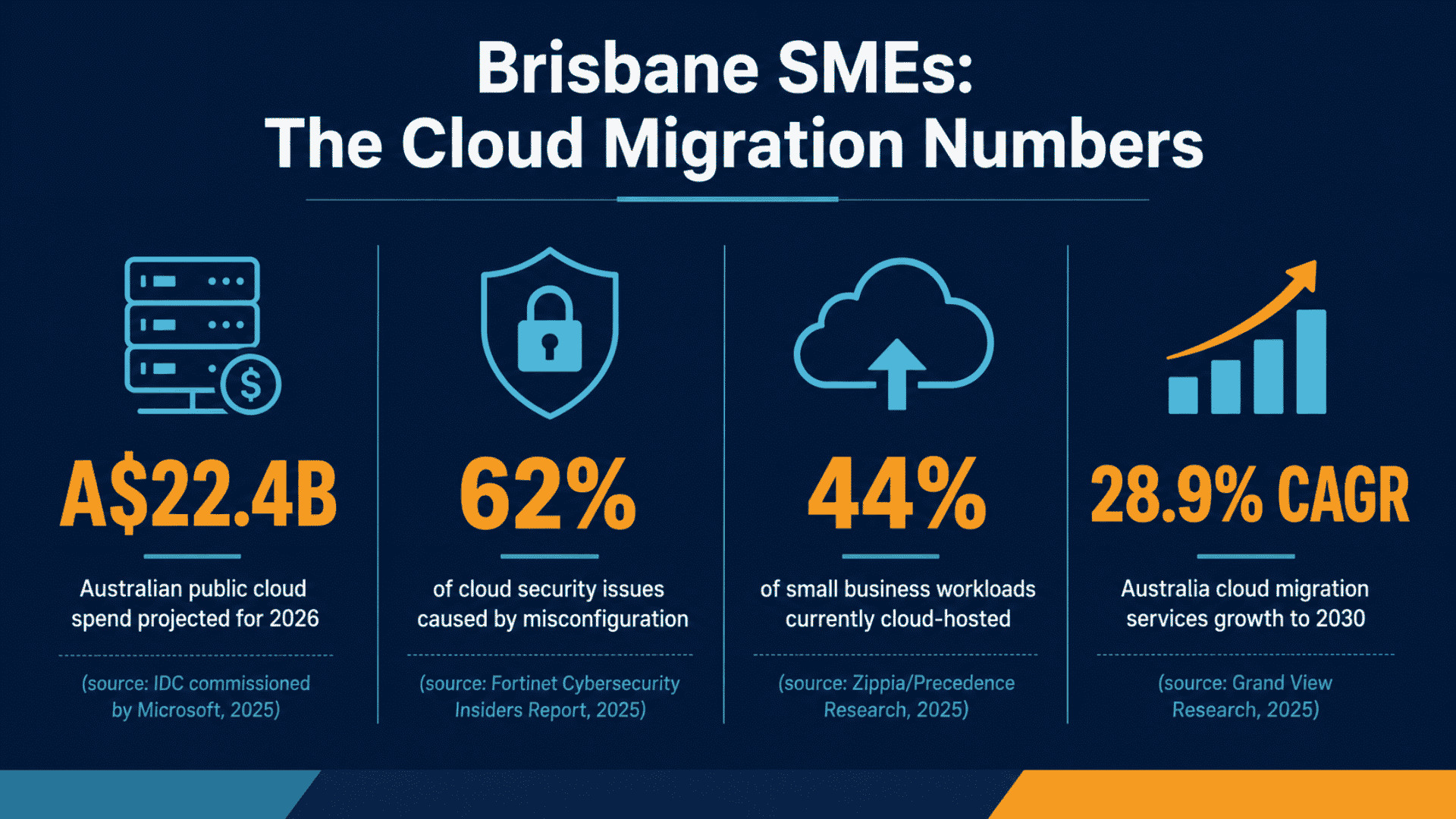
Australia’s cloud boom is well underway, and Brisbane small businesses that delay are leaving real competitive ground on the table. According to IDC research commissioned by Microsoft, public cloud spending in Australia is projected to reach A$22.4 billion in 2026, an 83% increase from A$12.2 billion in 2022. Yet many local business owners still feel overwhelmed by the prospect of migrating away from on-premise servers. Where do you start? What do you move first? And how do you make sure you do not accidentally expose sensitive customer data in the process? This guide walks you through a secure, practical approach to cloud migration in Brisbane. It covers everything from initial assessment through to hardening your environment. This protects against the misconfiguration risks that catch so many small businesses off guard.
Why Brisbane Small Businesses Are Moving to the Cloud in 2026
The shift is not just hype. According to IT Start, more than 60% of Australian SMEs now use cloud services for daily operations. Flexibility and security are cited as the primary drivers. For Brisbane businesses, the appeal is straightforward: predictable monthly costs, plus room to scale with seasonal demand. There is also freedom from the capital expense of ageing server hardware.
The data also confirms that SMEs have significant room to grow. According to Zippia and Precedence Research, only 44% of small business workloads and data are currently cloud-hosted. That compares to 74% for large enterprises. That gap represents both an opportunity and a risk. Businesses that migrate thoughtfully and securely will gain the operational agility their larger competitors already enjoy. Those that rush the process, or skip the planning stages, often make headlines. Unfortunately, it is usually for the wrong reasons.
Cloud migration in Brisbane is also being shaped by data sovereignty concerns. Sovereign cloud IaaS spending in Australia is expected to reach $80 billion in 2026, according to Auvik. As a result, local businesses are increasingly conscious of keeping data within Australian borders to meet regulatory obligations. Choosing providers with Australian data centres is no longer optional for many industries; it is a compliance requirement.
Step One: Assess Your Workloads Before You Move Anything
The single biggest mistake small businesses make with cloud migration is trying to move everything at once. A structured workload assessment is the foundation of every successful migration project. Before you speak to any vendor or sign any contract, get a clear picture of what you are running. You also need to know how business-critical and complex each workload is to migrate.
Start by cataloguing your current environment. List every application, database, shared drive, and service your team relies on daily. Then categorise each workload into one of three buckets:
- Low complexity, low risk: File storage, email, and collaboration tools. These are ideal candidates to migrate first. Microsoft 365 is the most common starting point for Brisbane SMEs and provides immediate productivity and security benefits.
- Medium complexity: Line-of-business applications, accounting software, or CRM platforms that may have cloud versions available. These require more planning but are well-supported by most cloud consulting services in Australia.
- High complexity: Custom-built applications, legacy databases, or workloads with strict latency requirements. These may need replatforming or refactoring before migration, or may ultimately stay on-premise in a hybrid arrangement.
A phased approach gives your team time to adapt. It also lets you resolve issues before they affect critical systems, and keeps costs manageable. Cloud migration costs for Australian small businesses handling 10 to 50 workloads range from AUD $70,000 to $200,000. This figure comes from an IDC whitepaper commissioned by Microsoft. Planning which workloads to prioritise helps you spend that budget where it delivers the most value first.
Step Two: Choose the Right Cloud Model for Your Business
Not every workload belongs in the same type of cloud environment. Understanding your options helps you match each workload to the right model. The best fit depends on your security, cost, and performance requirements.
Public Cloud (SaaS and IaaS)
Platforms like Microsoft 365, Google Workspace, and Azure are the most common entry points for Brisbane small businesses. According to Mordor Intelligence, public cloud captured 68.85% of the Australia and New Zealand cloud computing market share in 2025. SaaS applications require minimal infrastructure management and are well suited to email, document management, and communication tools.
Hybrid Cloud
A hybrid approach keeps some workloads on-premise while moving others to the cloud. It is particularly useful for businesses in regulated industries where certain data must remain on local infrastructure. It also suits cases where latency-sensitive applications cannot yet be fully migrated. Mordor Intelligence reports hybrid cloud is growing at a 22.40% CAGR through 2031 across Australia and New Zealand. This reflects how many businesses are choosing a gradual, rather than all-at-once, transition.
Sovereign Cloud
For businesses handling sensitive customer data, health records, or government contracts, compliance assurance matters most. Sovereign cloud options with Australian-based data residency provide exactly that. When evaluating cloud migration services in Australia, always confirm where your provider stores and processes data.
Step Three: Harden Your Environment from Day One
Why Misconfiguration Is Your Biggest Risk
Security cannot be an afterthought in any cloud migration project. The threat landscape in Australia is unforgiving, and the data backs this up clearly. According to the Fortinet Cybersecurity Insiders Report, misconfiguration accounts for 62% of cloud security issues in Australia. This is not just a technical problem for enterprise IT teams. It is the leading cause of data exposure for small businesses too.
Fortinet FortiGuard Labs research also confirms that misconfigured cloud services remain a frequent source of data exposure. Cloud migration projects increasingly need zero-trust and conditional access policies to mitigate credential abuse. Here is what secure configuration looks like in practice for a Brisbane small business:
Five Security Practices to Implement From Day One
- Enable Multi-Factor Authentication (MFA) for all accounts: This is non-negotiable. MFA blocks the vast majority of credential-based attacks and takes minutes to configure in Microsoft 365 or Google Workspace.
- Apply conditional access policies: Restrict access to cloud resources based on user role, device compliance status, and location. This is the zero-trust model in action and it is accessible even for small business tenants.
- Review permissions and access rights: Over-permissioning is one of the most common misconfiguration issues. Audit who has access to what, and apply the principle of least privilege across every account.
- Encrypt data in transit and at rest: Most major cloud platforms enable this by default. Verify it is active, and understand what your provider’s shared responsibility model covers.
- Configure audit logging and alerts: You cannot respond to what you cannot see. Enable logging across your cloud tenancy, and set up alerts for suspicious activity. This includes bulk downloads, logins from unusual locations, or permission changes.
For businesses migrating to Microsoft 365, hardening your tenant from the outset is far easier. Retrofitting security controls after the fact is far more difficult. Engaging a provider with genuine experience in cloud migration services in Australia makes a measurable difference. Choose a specialist, not just a reseller.

Step Four: Migrate Microsoft 365 and Core SaaS Platforms
Microsoft 365 is where most Brisbane small business cloud migrations begin. It covers email, file storage, video conferencing, and team collaboration under a single subscription. This makes it the fastest way to reduce reliance on on-premise infrastructure. If you also support staff on the Gold Coast or across Southeast Queensland, the same principles apply. Microsoft 365 migration on the Gold Coast follows this approach and benefits from the same centralised management tools.
A well-executed Microsoft 365 migration covers the following steps:
- Domain and DNS preparation: Verify your domain and update DNS records in the correct sequence to avoid email delivery disruption.
- User account provisioning: Create accounts, assign licences, and configure security defaults before migrating any data.
- Mailbox migration: This may be a cutover, staged, or hybrid migration. The right choice depends on your current mail platform and team size.
- SharePoint and OneDrive setup: Migrate file shares to SharePoint Online or OneDrive. Establish folder structures and set appropriate permissions from the start.
- Teams configuration: Set up channels, connect relevant apps, and train staff before the official go-live date.
- Post-migration security review: Verify MFA is enforced, conditional access is active, and external sharing settings match your business risk appetite.
Rushing this process, especially the permissions and security configuration steps, is exactly how misconfiguration issues occur. Taking the time to do it properly is far less costly than dealing with a data breach after the fact.
Step Five: Manage Costs and Plan for Ongoing Optimisation
One of the most common surprises for Brisbane businesses after migration is discovering that cloud costs are higher than expected. This usually happens when unused resources are left running or storage is not tiered appropriately. It can also happen when licences are not matched to actual usage.
Cost management should be built into your migration plan from the beginning, not addressed six months after go-live. Key practices include:
- Right-sizing virtual machines and storage to match actual workload requirements, not theoretical peak demand.
- Using reserved instances or annual commitment pricing where workloads are predictable, rather than defaulting to pay-as-you-go for everything.
- Reviewing licences quarterly and removing or downgrading accounts for staff who have left or changed roles.
- Setting up cloud cost monitoring dashboards and budget alerts so unexpected spending is visible before it becomes a problem.
Engaging experienced cloud consulting services in Australia gives you ongoing optimisation guidance. This goes well beyond a one-time migration project. According to Auvik, 75% of CFOs plan to increase technology budgets with cloud at the helm. Leadership expects cloud investment to deliver measurable business value, and a managed approach is how you ensure it does.
Ready to Start Your Cloud Migration in Brisbane?
Moving to the cloud is one of the most impactful technology decisions a Brisbane small business can make in 2026. But there is a big difference between a migration that delivers real business value and one that creates security headaches. That difference comes down to planning and execution. Three factors determine success: a phased approach, a security-first mindset, and experienced support. Your provider should understand the Australian regulatory environment.
Netcomp Solutions helps Brisbane and Southeast Queensland small businesses plan and execute secure cloud migrations. This spans Microsoft 365 and Azure through to full IaaS environments. We handle the technical complexity so you can focus on running your business.
Contact the Netcomp team today to discuss your cloud migration requirements. You’ll get a clear, no-obligation assessment of your current environment and the best path forward.
Frequently Asked Questions
How long does a cloud migration take for a Brisbane small business?
The timeline depends on the number and complexity of workloads you are moving. A Microsoft 365 migration for a team of 10 to 20 people can be completed within two to four weeks. This assumes careful planning. A full migration from on-premise servers to cloud IaaS typically takes two to six months for most small businesses. This includes testing and cutover. A phased approach starts with low-risk workloads like email and file storage. This lets you gain confidence and manage disruption before tackling more complex systems.
Is cloud migration expensive for small businesses in Australia?
Costs vary depending on scope and complexity. For small businesses migrating 10 to 50 workloads, IDC research suggests a range of AUD $70,000 to $200,000. This covers assessment, rehosting, and basic security configuration. However, many Brisbane businesses start with a focused Microsoft 365 migration at a much lower cost and expand from there. The ongoing savings come from eliminating server hardware, maintenance contracts, and on-site IT support. These savings typically offset migration investment within 12 to 24 months.
What are the biggest security risks during cloud migration?
Misconfiguration is the leading risk. It is responsible for 62% of cloud security issues in Australia, according to the Fortinet Cybersecurity Insiders Report. This includes incorrect permission settings, publicly accessible storage buckets, disabled MFA, and overly broad access rights. The best way to mitigate these risks is to follow a security-first migration process. This means applying conditional access policies and enforcing MFA from day one. It also means conducting a formal post-migration security review before decommissioning any on-premise infrastructure.
Do I need cloud consulting services in Australia or can I do it myself?
Very simple migrations can often be managed internally. An example is moving a single small team from a legacy email platform to Microsoft 365. A capable resource with some technical background is usually enough. However, most Brisbane small businesses face more complexity. This includes migrating multiple workloads, managing data sovereignty requirements, or operating in regulated industries like healthcare, finance, or legal services. In these cases, working with experienced cloud consulting services in Australia significantly reduces risk. It typically results in a better-configured, more cost-efficient outcome. The cost of professional guidance is almost always lower than the cost of fixing a misconfiguration after the fact.