Technically reviewed by Vitaly Ogulev, founder of Netcomp Solutions (Brisbane managed IT and cyber security since 2002).
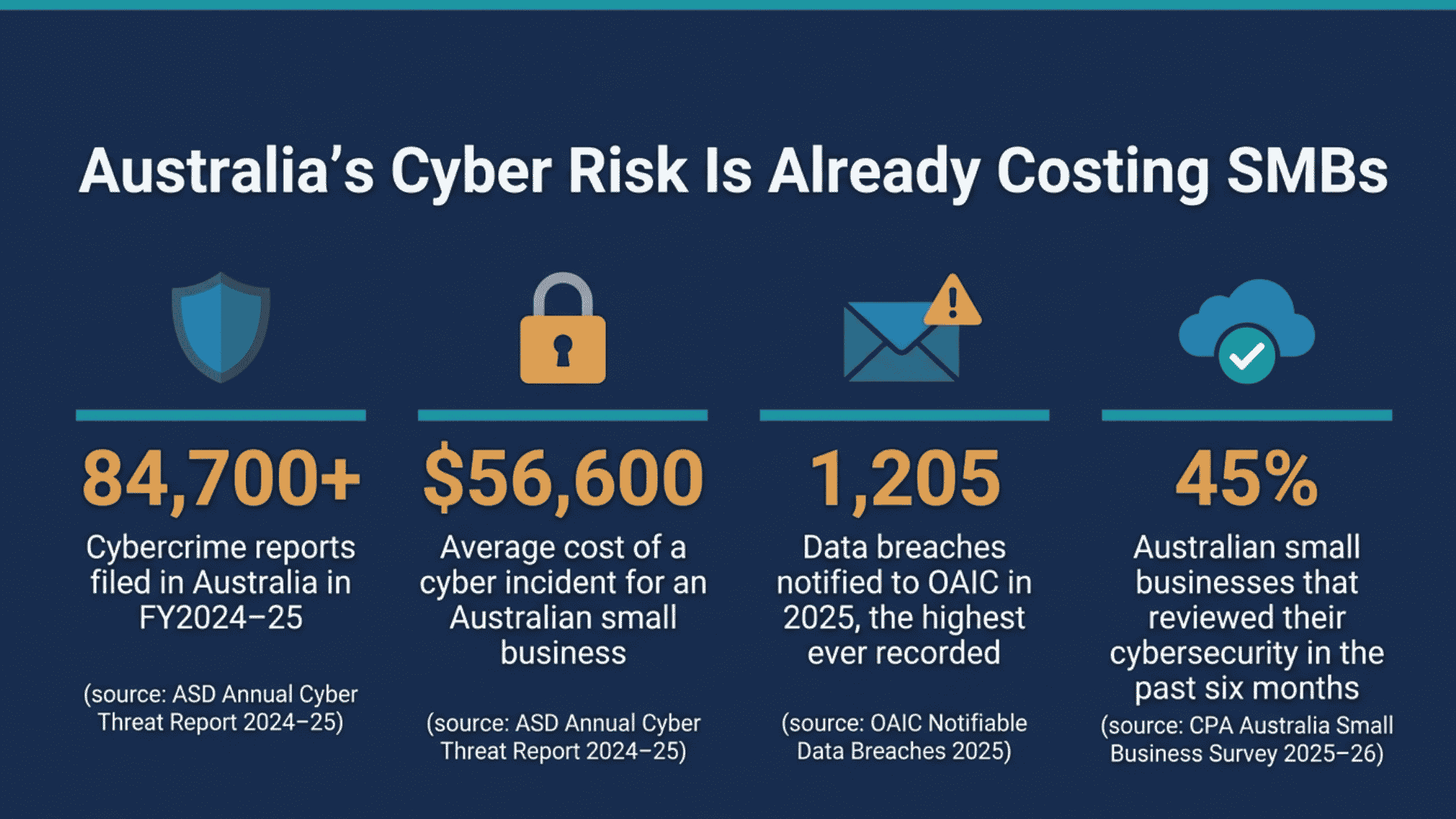
Australian businesses are under relentless digital pressure. According to the ASD, Australians lodged more than 84,700 cybercrime reports in FY2024-25 — one every six minutes. For Brisbane and Gold Coast small businesses running Microsoft 365, that pressure lands squarely in the inbox. Email compromise was the top self-reported cybercrime type for Australian businesses, accounting for 19% of all business reports. Meanwhile, the average cost per incident for a small business now sits at $56,600. If your Microsoft 365 tenant still runs on default settings, you are carrying real risk. Your competitors, your clients, and your cyber insurer will not ignore that risk in 2026. This guide gives you a practical, prioritised checklist of security controls to activate now. We wrote it specifically for the Australian small business context.
Why Microsoft 365 Security for Small Business Australia Cannot Wait
Many Brisbane and Gold Coast business owners assume that paying for Microsoft 365 subscriptions means Microsoft automatically protects them. The reality is that Microsoft provides the platform; securing that platform is your responsibility. Microsoft designs out-of-the-box settings for broad compatibility, not maximum protection. As a result, attackers know exactly which defaults to exploit.
The financial stakes are significant. According to the ACSC, the average self-reported cost of a cybercrime incident for a small business hit $56,600 in 2024-25. That figure is up from $49,615 the previous year. It covers lost revenue, recovery costs, and reputational damage, not legal liability or regulatory penalties under the Privacy Act. According to the OAIC, organisations notified 1,205 data breaches in calendar 2025 — the highest annual total since mandatory reporting began. Many of those breaches originated from compromised cloud credentials.
Meanwhile, according to CPA Australia, only 45% of Australian small businesses reviewed their cybersecurity protections in the past six months. That means more than half are running unchanged configurations in a threat environment that evolves daily. For Brisbane and Gold Coast SMBs, that gap is both a risk and an opportunity. You can get ahead of the competition by locking down Microsoft 365 security before an incident forces the issue.
Step One: Microsoft 365 MFA Setup Australia Wide Should Be Your First Action
Multi-factor authentication (MFA) is the single most effective control you can enable in your Microsoft 365 tenant. Microsoft’s own data consistently shows that MFA blocks more than 99% of automated credential-based attacks. Despite that, many small businesses in Brisbane and across Australia are still relying on passwords alone.
For a practical Microsoft 365 MFA setup, start with Security Defaults if your team is new to MFA. Security Defaults enforces MFA for all users, blocks legacy authentication protocols, and requires MFA for privileged roles. It takes less than five minutes to enable from the Microsoft Entra admin centre. Better still, it costs nothing beyond your existing licence.
If your business is ready to move beyond Security Defaults, shift to Conditional Access policies. These policies let you require MFA only under specific conditions. For example, they can demand it when a user signs in from an unrecognised device or an overseas IP address. Meanwhile, staff working from a trusted Brisbane office face minimal friction. You can also require compliant devices as a condition of access, which ties neatly into your device management strategy.
Key actions for MFA hardening in 2026 include:
- Enable Security Defaults or Conditional Access for all users without exception
- Require MFA for all administrator accounts as an immediate priority
- Block legacy authentication protocols such as IMAP and SMTP AUTH unless your operations require them
- Use the Microsoft Authenticator app rather than SMS codes where possible, as SMS is vulnerable to SIM-swapping attacks
- Review and audit MFA registration for every active account quarterly
Conditional Access Small Business Brisbane: Going Beyond the Basics
Conditional Access is where Microsoft 365 security for small business in Australia moves from reactive to proactive. Think of Conditional Access policies as the intelligent gatekeepers of your tenant. Rather than simply asking for a password, they evaluate the context of every login attempt. Then they decide whether to grant access, require additional verification, or block the request entirely.
For Brisbane SMBs, practical Conditional Access policies to implement in 2026 include:
- Block sign-ins from high-risk countries: If your business does not operate in Eastern Europe or Southeast Asia, logins have no legitimate reason to originate there. A geo-block policy is simple to configure and eliminates a large volume of opportunistic attacks.
- Require compliant or hybrid-joined devices: This ensures only managed devices enrolled in Microsoft Intune can access company data. As a result, a compromised personal device cannot become an entry point.
- Sign-in risk policies: Microsoft Entra ID Protection assesses each sign-in for risk signals such as leaked credentials or unfamiliar locations. Configuring a policy that forces MFA re-verification or blocks high-risk sign-ins adds a second layer of automated defence.
- Session controls for sensitive apps: Applications like SharePoint and Teams handle confidential documents. For these, you can enforce session time limits and restrict downloads to unmanaged devices.
Conditional Access requires Microsoft Entra ID P1 licences, which Microsoft 365 Business Premium already includes. If your Brisbane business is on a lower-tier plan, consider upgrading to Business Premium. It is one of the highest-return investments available in the Microsoft 365 ecosystem.
Microsoft Defender for Business Gold Coast and Brisbane SMBs: Endpoint Protection Built In
Microsoft 365 Business Premium includes Microsoft Defender for Business, which delivers enterprise-grade endpoint protection. Microsoft sizes and prices it for small business. Many Gold Coast and Brisbane SMBs have previously relied on third-party antivirus software. For them, Defender for Business represents a significant upgrade in capability without an additional licence cost.
According to the ACSC, ransomware featured in 11% of all incidents the ASD responded to in 2024-25. Defender for Business directly addresses this threat in several ways. It combines several defences: automated investigation and response, next-generation antivirus, attack surface reduction rules, and tamper protection. Tamper protection stops malware from disabling your security tools.
To harden Defender for Business in 2026, focus on these actions:
- Onboard all Windows, macOS, iOS, and Android devices to the Microsoft 365 Defender portal
- Enable attack surface reduction rules to block common ransomware delivery methods. These include malicious Office macros and executable files that arrive by email
- Activate tamper protection so that no one can modify endpoint security settings without administrator approval
- Review the Vulnerability Management dashboard weekly to identify and patch unaddressed software vulnerabilities on business devices
- Configure automated investigation and remediation to speed up response to detected threats
Defender for Business also integrates with Microsoft Sentinel and third-party SIEM tools. This matters for Brisbane SMBs who work with a managed security service provider that monitors alerts outside business hours.
SharePoint and OneDrive Backup Brisbane: Do Not Rely on Microsoft Alone
Many Brisbane and Gold Coast small business owners hold a persistent misconception. They assume Microsoft automatically backs up SharePoint and OneDrive data. Microsoft provides platform redundancy and a limited version history. However, it does not offer true point-in-time backup and recovery for business data. Suppose a ransomware attack encrypts your SharePoint libraries, or a staff member permanently deletes critical files. In that case, Microsoft’s native tools may not recover everything you need.
This matters because Australian businesses increasingly run core operations in the cloud. According to the ABS, around 59% of Australian businesses use cloud technology, among their most widely used tools. SharePoint and OneDrive hold your contracts, client records, and financial data. When they do, a gap in backup coverage becomes a business continuity risk.
Best-practice SharePoint and OneDrive backup for Brisbane SMBs in 2026 includes:
- Deploying a dedicated Microsoft 365 backup solution such as Veeam, Datto SaaS Protection, or AvePoint Cloud Backup
- Configuring daily automated backups to an Australian data centre to meet data sovereignty requirements
- Testing restoration at least quarterly to verify that recovery works before an incident occurs
- Extending backup coverage to Exchange Online mailboxes, Teams conversations, and OneNote data, alongside SharePoint and OneDrive
A managed IT provider can manage this backup layer on your behalf. They handle retention policies, restoration tests, and compliance reporting. As a result, you avoid relying on internal staff who have limited time and experience with backup administration.
Email Security Hardening: Closing the Door on Business Email Compromise
Email compromise is the top self-reported cybercrime type for Australian businesses. For that reason, hardening Microsoft 365 email security deserves its own focus. The good news is that Microsoft 365 Business Premium includes Defender for Office 365 Plan 1. This provides a powerful set of email security controls. Yet most small businesses leave those controls partially or fully unconfigured.
Critical email hardening steps for Brisbane and Gold Coast SMBs include:
- Enable Safe Links and Safe Attachments: Safe Links rewrites URLs in emails and documents, checking them against Microsoft’s threat intelligence at the moment a user clicks. Safe Attachments detonates suspicious file attachments in a sandbox environment before they reach the recipient’s inbox.
- Configure anti-phishing policies: Enable impersonation protection for your key executives and domain names. In addition, raise the phishing threshold sensitivity to aggressive for finance and senior leadership users.
- Publish SPF, DKIM, and DMARC records: These three DNS-based email authentication standards guide receiving mail servers. They dictate how to handle emails that claim to be from your domain. A DMARC policy set to reject is the strongest available protection against domain spoofing and brand impersonation.
- Audit mail flow rules and connectors: Attackers who compromise a mailbox often create forwarding rules to silently copy emails to external addresses. Regular audits of mail flow rules and inbox rules catch this technique early.
- Enable Microsoft’s Attack Simulator: Running simulated phishing campaigns against your own staff builds awareness and identifies who needs additional training without a real incident.
How Netcomp Helps Brisbane and Gold Coast SMBs Manage Microsoft 365 Security
Knowing what to configure is one challenge. Finding the time, skills, and ongoing capacity to configure, monitor, and maintain it is another. According to CPA Australia, only 17% of Australian small businesses sought advice from IT consultants or specialists. That means the majority navigate Microsoft 365 security decisions without professional guidance. In 2025, 14% of small businesses reported losing time or money to a cyber incident. That gap therefore carries real financial consequences.
Netcomp Solutions works with Brisbane and Gold Coast small businesses as a local managed IT partner. We take ownership of Microsoft 365 security configuration, monitoring, and ongoing optimisation. Our approach covers tenant hardening across every area this article describes. That ranges from MFA and Conditional Access to Defender for Business deployment. It also includes email security policy management and third-party backup for SharePoint and OneDrive.
We translate Microsoft 365 complexity into clear, prioritised actions that match your budget and risk profile. Perhaps you are starting from scratch on Security Defaults. Or perhaps you are ready to move to a fully managed security posture. Either way, Netcomp provides the local expertise and ongoing support that Brisbane and Gold Coast SMBs need. With it, you can stay ahead of the threat landscape in 2026.
Are you ready to strengthen your Microsoft 365 security posture? Contact the Netcomp team today for a no-obligation Microsoft 365 security assessment tailored to your business.
Frequently Asked Questions
What is the most important Microsoft 365 security control a small business in Brisbane should enable first?
MFA is the single highest-impact control available. Enabling MFA for all accounts, starting with administrator accounts, blocks the overwhelming majority of automated credential attacks. If your business has Microsoft 365 Business Basic or Standard, enable Security Defaults immediately. If you have Business Premium, configure Conditional Access policies for more granular control. Everything else in this checklist builds on top of a solid MFA foundation.
Does Microsoft 365 Business Premium include enough security for a small business, or do I need additional tools?
Microsoft 365 Business Premium is a strong foundation for small business security in Australia. It includes MFA, Conditional Access, Defender for Business, and Defender for Office 365 Plan 1. Most businesses typically need to invest in one extra area: third-party backup for SharePoint, OneDrive, and Exchange Online. Microsoft’s native retention and version history does not replace true point-in-time backup. A managed IT provider can help you assess whether you need any additional security tooling. That depends on your specific industry and risk profile.
How often should Brisbane SMBs review their Microsoft 365 security settings?
You should conduct a thorough Microsoft 365 security review at least every six months, with ongoing monitoring in between. Microsoft regularly releases new security features, updates its Secure Score recommendations, and adjusts default behaviours. Best practice calls for quarterly reviews of MFA registration, mail flow rules, Conditional Access policies, and Defender alerts. Working with a local managed IT provider means these reviews happen consistently. You no longer rely on internal staff to remember and schedule them.
What is the risk if my Brisbane business does not configure DMARC for Microsoft 365 email?
Without a DMARC record, attackers can send emails that appear to come from your domain. Those emails can reach your clients, suppliers, and staff. Attackers rely on this core technique in business email compromise. That was the top self-reported cybercrime type for Australian businesses in 2024-25. A DMARC policy set to reject, combined with correctly published SPF and DKIM records, closes this attack vector. Misconfigured DMARC can also disrupt legitimate email delivery, so we strongly recommend professional configuration and monitoring.